

Section: Module 2: Lesson 4: Graphing Linear Equations | Intro to Algebra & Trigonometry | NextGenU.org
-
Student Learning Outcomes:
Upon completion of this lesson, you will be able to:- Graph equations on the rectangular coordinate system.
- Find the distance between two points.
- Find the mid-point of a line from its equation.
- Explain what the slope of a line is, and be able to find the slope of a given line.
- Explain the connection between slope and rate of change, and find rates of change in application problems.
- Graph a linear equation.
-
Students mustMark as done
Required Learning Resources and Activities
-
Students mustView
Read Section 2.1: The Rectangular Cooordinate System and Graphs - Pages 108-118. (20 minutes)
OpenStax College, Rice University - 2015
-
Students mustView
Read Sections 2.1.5: The Distance Formula, Pages 118-122. (10 minutes)
OpenStax College, Rice University - 2015
-
Students mustView
Read Section 2.1.6: The Mid-Point Formula - Pages 122-123. (10 minutes)
OpenStax College, Rice University - 2015
-
Students mustView
Read Page: Slope of a Line. (15 minutes)
Lumen Learning
-
Students mustView
Read Section 6.02: Slope and Rate of Change. (15 minutes)
Math Space - 2021
-
Students mustView
Read Section 8.1: Graphing - Pages 569-575. (30 minutes)
Department of Mathematics College of the Redwoods - 2013
-
Students mustView
Read Section 8.2: Graphing Linear Equations- Pages 581-588. (30 minutes)
Department of Mathematics College of the Redwoods - 2013
-
Students mustViewStart discussions: 1
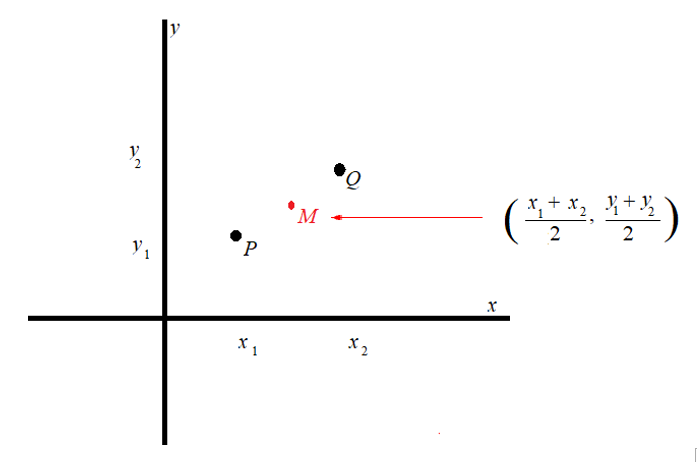
In this activity, you will study a Cartesian system and show how the distance formula can be used to prove that a point has the same distance as other points in the system.
Step 1. Review
Review the learning resources for this module, especially the distance formula.
Step 2. Analyze
Analyze the Cartesian system below and how can you use the distance formula to show that Point M is the same distance from Point P and Point Q.
Step 3. Respond
Respond by showing all the mathematical steps and citing all properties or theorems you used to enable you to move from step to step as justifications. Put all your work into writing.
Step 4. Share
To share your work, click on the “Add new discussion topic” button under this post and paste your work in the “Message” box. Make sure to reference others’ intellectual property when necessary. All references should follow 7th Edition APA formatting. For further instructions, see the resource on the Himmelfarb Health Sciences Library: APA citation resource (N.B. references are excluded from word counts).
Step 5: Interact
To complete the activity, you will need to reply to at least two posts made by your peers in a respectful and professional manner. Ensure that your post engages your peers' ideas by including a reflection on their comments, sharing ideas of other potential difficulties and parties involved, or asking thought-provoking questions. If peer comments on your posting, please reply. To post a reply, click “Reply” on a particular discussion, write your feedback and then click on “post to the forum.”
OPTIONAL Step 6: Interact (10 minutes)
If you would like to, you can reply to your peers' posts in a respectful and professional manner. Ensure that your post engages your peers' ideas by including a reflection on their comments, sharing ideas of other potential difficulties and parties involved, or asking thought-provoking questions. If a peer comments on your posting, please reply. To post a reply, click “Reply” on a particular discussion, write your feedback and then click on “Post to forum.”
-
Quiz: Module 2: Lessons 3 - 4To access the quiz, click on the name of the quiz provided above. On the following screen, click the "Preview quiz now" button to respond to the questions.
TO PASS THIS QUIZ YOU MUST OBTAIN A SCORE OF 80%. -
Students mustViewReceive a gradeReceive a passing gradeTo access the quiz, click on the name of the quiz provided above. On the following screen, click the "Preview quiz now" button to respond to the questions.