Section: Module 1: Lesson 3: Speed, Velocity, and Acceleration | Physics | NextGenU.org
-
Upon completion of this lesson, you will be able to:Learning Objectives:
- Explain the relationships between instantaneous velocity, average velocity, instantaneous speed, average speed, displacement, and time.
- Calculate velocity and speed given initial position, initial time, final position, and final time.
- Represent and calculate acceleration using graphical methods .
- Analyze and describe how the values of the position, velocity, and acceleration change during a free fall.
- Apply the principle of independence of motion to solve projectile motion problems.
-
Students mustMark as done
Required Learning Resources and Activities
-
Students mustView
Read the entire page and watch the videos. (25 minutes)
OpenStax - 2023
-
Students mustView
Read the entire page and watch the videos. (25 minutes)
OpenStax - 2023
-
-
Students mustView
Read the entire webpage and, if you are able to, interact with the virtual demonstration. (16 minutes)
OpenStax - 2023
-
Students mustView
Read the entire webpage and, if you are able to, interact with the virtual demonstration. (28 minutes)
OpenStax - 2023
-
Students mustView
Read the entire webpage and, if you are able to, interact with the virtual demonstration. (37 minutes)
OpenStax - 2023
-
Students mustView
Read the entire page and watch the videos. (13 minutes)
The LibreTexts Physics - 2019
-
Students mustView
Read the entire page. (31 minutes)
The LibreTexts Physics - 2022
-
Students mustViewStart discussions: 1
Step 1. Review
Review the learning resources for this lesson before studying the case problem.
Step 2. Analyze
Analyze the case problem below.
Background: A projectile is an object that is projected or launched into the air and then moves through the air under the sole influence of gravity. In this sense, a projectile is a free-falling object that experiences a downward acceleration of approximately 10 m/s/s.
Getting Ready: Navigate to the Projectile Simulator in the Physics Interactives section of The Physics Classroom website:
http://www.physicsclassroom.com/Physics-Interactives/Vectors-and-Projectiles/Projectile-Simulator
Click on Launch Interactive
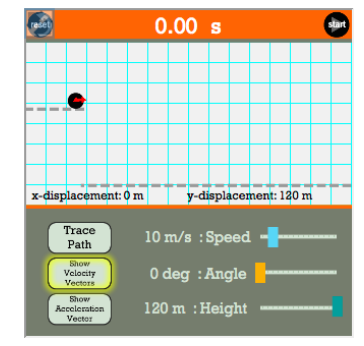
Once the Interactive opens, set the Speed to 10 m/s. Set the Angle to 0 degrees. Set the Height to 120 m. Select Show Velocity Vectors in order to enable this feature.
Directions and Questions:
1. Click the Start button and observe the simulation. The red arrows are velocity vectors. They are indicators of how fast the object is moving horizontally and vertically. The length of the arrow indicates how fast the object is moving in that direction. Does the object change how fast it is moving in the horizontal direction? _________ Explain why you answered this way.
2. Reset and Start the animation again to answer the following question: Does the object change how fast it is moving in the vertical direction? _________ Explain why you answered this way.
3. How does the initial horizontal velocity (right after it starts moving) compare to the final horizontal velocity (just before hitting the ground)? a. They are equal. b. The initial is greater c. The final is greater
4. How does the initial vertical velocity (right after it starts moving) compare to the final vertical velocity (just before hitting the ground)? a. They are equal. b. The initial is greater c. The final is greater
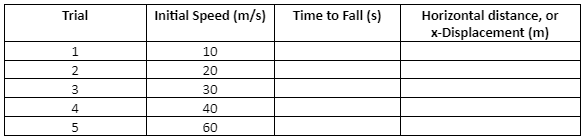
5. Now run the several trials to fill in the table. Click Reset after each trial to prepare for the next. Keep the initial height at 120 m and the angle at 0 degrees.
Step 3. Respond
After analyzing the data above, respond to the case problem by answering the following questions:
6. Describe the effect that increasing launch speed has upon the time to fall.
7. Describe the effect that increasing launch speed has upon the horizontal distance or x-displacement.
Step 4. Share
To share your work, click on the “Reply” button under this post and paste your work (the answers to the questions) into the “Message” box. Make sure to reference others’ intellectual property when necessary. All references should follow 7th Edition APA formatting. For further instructions, see the resource on the Himmelfarb Health Sciences Library: APA citation resource (N.B. references are excluded from word counts).
Step 5: Interact
To complete the activity, evaluate and categorize the work from one of your peers based on items A - D of this rubric. Provide a rationale for your grade and comments or suggestions for improvement. To post a reply, click “Reply” on a particular discussion, write your feedback, then click “Post to forum.” You can use the list below as an example:
Item A is .…. because…. My suggestions for improvement are….
Item B is .…. because…. My suggestions for improvement are….
Item C is .…. because…. My suggestions for improvement are….
Item D is .…. because…. My suggestions for improvement are….OPTIONAL Step 6: Interact (10 minutes)
If you would like to, you can reply to your peers' posts in a respectful and professional manner. Ensure that your post engages your peers' ideas by including a reflection on their comments, sharing ideas of other potential difficulties and parties involved, or asking thought-provoking questions. If a peer comments on your posting, please reply. To post a reply, click “Reply” on a particular discussion, write your feedback and then click on “Post to forum.”
OPTIONAL Step 7: Interact (10 minutes)
If you would like to, you can reply to your peers' posts in a respectful and professional manner. Ensure that your post engages your peers' ideas by including a reflection on their comments, sharing ideas of other potential difficulties and parties involved, or asking thought-provoking questions. If a peer comments on your posting, please reply. To post a reply, click “Reply” on a particular discussion, write your feedback and then click on “Post to forum.”
-
Quiz: Module 1
To access the quiz, click on the name of the quiz provided above. On the following screen, click the "Preview quiz now" button to respond to the questions.
TO PASS THIS QUIZ YOU MUST OBTAIN A SCORE OF 80%.
- Explain the relationships between instantaneous velocity, average velocity, instantaneous speed, average speed, displacement, and time.