Section: Module 4: Lesson 4: Doppler Effect, Sound Interference, and Resonance | Physics | NextGenU.org
-
Upon completion of this lesson, you will be able to:Learning Objectives:
- Calculate the frequency shift of sound from a moving object by the Doppler shift formula, and calculate the speed of an object by the Doppler shift formula.
- Contrast an open-pipe and closed-pipe resonator.
- Solve problems involving harmonic series and beat frequency.
-
Students mustMark as done
Required Learning Resources and Activities
-
Students mustView
Read the entire page and watch the videos. (47 minutes)
OpenStax - 2023
-
Students mustView
Read the entire webpage and, if you are able to, interact with the virtual demonstration. (35 minutes)
OpenStax - 2023
-
Students mustViewStart discussions: 1
Step 1. Review
Review the learning resources for this lesson before studying the case problem.
Step 2. Analyze
Analyze the case problem below.
Directions and Questions:
Navigate to the Wave Addition simulation of The Physics Classroom at:https://www.physicsclassroom.com/Physics-Interactives/Waves-and-Sound/Wave-Addition/Wave-Addition-Interactive
Getting Acquainted: The Wave Addition Interactive displays two animated waves – Wave 1 (Red) and Wave 2 (Blue) – and the Wave Sum (1 + 2) at the top of the simulation window. The controls and buttons are located at the bottom of the simulation window. Before you begin this activity, get acquainted with how it works by playing with the various buttons and slider controls. Tap a button or drag a slider and observe how the waves change or how the wave display changes. Don’t worry about ruining anything. You can always reload the page to reset the simulation to its original state. Your goal is to get acquainted with the interface and to do a bit of exploring of waves. Be sure to learn how to adjust the various wave properties of both Wave 1 (Red) and Wave 2 (Blue). These properties include frequency (f), wavelength (l), velocity or speed (v), and wavelength (λ). Learn how to stop and start the simulation, how to display a Dot, a Line, and an Amplitude Bar for the waves, and how to change the wave from a transverse wave to a longitudinal wave.
Procedures and Questions:
1. Once you have done some exploring as described in the Getting Ready section, you are ready to study Wave Interference. Tap on the Destruct button in the top row of the Control Panel.
Finally, tap on the Line and the Dots buttons so that the wave is represented by a collection of dots and connecting lines. The dots can be thought of as the particles of the medium. For instance, you could think of each dot as representing each coil of a Slinky or as a very small section of a vibrating rope.
2. Run the simulation so that Wave 1 and Wave 2 are moving. Observe the Wave Sum (labeled 1 + 2). Describe the displacement of each individual dot for the Wave Sum.
3. Interference is the meeting up of two waves that are traveling through the same medium. This form of interference that is occurring at each location is known as Destructive Interference. Stop the simulation so that you can answer the following question.Destructive interference will occur at any location where …
a. Each individual wave is stationary.
b. the displacement of particles for both waves is in the same direction (e.g., both up).
c. the displacement of particles for one wave is upward and the other is downward.
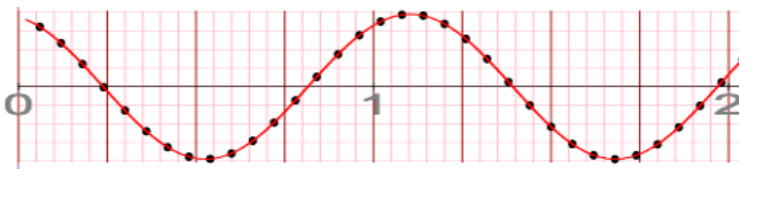
4. Consider the wave below. We will call it Wave 1. Sketch what Wave 2 must look like in order for it to interfere with Wave 1 such that destructive interference occurs for every particle along the length of the 2-meter long medium.5. Tap on the Construct button in order to view an example of constructive interference. Describe how the Wave Sum for a constructive interference situation is different than destructive interference.
6. Stop the simulation and analyze any of the points along the medium in order to answer this:
Constructive interference will occur at any location where …
a. Each individual wave is stationary.
b. The displacement of particles for both waves is in the same direction (e.g., both up).
c. The displacement of particles for one wave is upward and the other is downward.
7. So far, we’ve seen situations in which Wave 1 and Wave 2 have the same amplitude. But constructive and destructive interference is not limited to situations in which each wave has the same amplitude. Tap on the Destruct button again. Observe the Wave Sum. Then change the amplitude of Wave 1 to 0.16 m; keep the amplitude of Wave 2 at 0.32 m. This is also an example of destructive interference. Observe the Wave Sum. Describe how it is different from a situation in which two waves have the same amplitude (as in Question 2).
Step 3. Respond
Write a 300-word summary of your lab and your reflections on it. Include the answers to the questions given above.
Step 4. Share
To share your work, click on the “Reply” button under this post and paste your work into the “Message” box. Make sure to reference others’ intellectual property when necessary. All references should follow 7th Edition APA formatting. For further instructions, see the resource on the Himmelfarb Health Sciences Library: APA citation resource (N.B. references are excluded from word counts).
Step 5: Interact
To complete the activity, evaluate and categorize the work from one of your peers based on items A - D of this rubric. Provide a rationale for your grade and comments or suggestions for improvement. To post a reply, click “Reply” on a particular discussion, write your feedback, then click “Post to forum.” You can use the list below as an example:
Item A is .…. because…. My suggestions for improvement are….
Item B is .…. because…. My suggestions for improvement are….
Item C is .…. because…. My suggestions for improvement are….
Item D is .…. because…. My suggestions for improvement are….OPTIONAL Step 6: Interact (10 minutes)
If you would like to, you can reply to your peers' posts in a respectful and professional manner. Ensure that your post engages your peers' ideas by including a reflection on their comments, sharing ideas of other potential difficulties and parties involved, or asking thought-provoking questions. If a peer comments on your posting, please reply. To post a reply, click “Reply” on a particular discussion, write your feedback and then click on “Post to forum.”
OPTIONAL Step 7: Interact (10 minutes)
If you would like to, you can reply to your peers' posts in a respectful and professional manner. Ensure that your post engages your peers' ideas by including a reflection on their comments, sharing ideas of other potential difficulties and parties involved, or asking thought-provoking questions. If a peer comments on your posting, please reply. To post a reply, click “Reply” on a particular discussion, write your feedback and then click on “Post to forum.”
-
Quiz: Module 4
To access the quiz, click on the name of the quiz provided above. On the following screen, click the "Preview quiz now" button to respond to the questions.
TO PASS THIS QUIZ YOU MUST OBTAIN A SCORE OF 80%.