

Section: Module 7: Lesson 2: Lenses | Physics | NextGenU.org
-
Upon completion of this lesson, you will be able to:Learning Objectives:
- Explain reflection from mirrors.
- Explain refraction at media boundaries.
- Describe and predict image formation and magnification as a consequence of refraction through convex and concave lenses.
- Explain how the human eye works in terms of geometric optics.
- Perform calculations involving diffraction and interference, in particular, the wavelength of light, using data from a two-slit interference pattern.
-
Students mustMark as done
Required Learning Resources and Activities
-
Students mustView
Read the entire page and watch the videos. (45 minutes)
OpenStax - 2023
-
Students mustView
Read the entire webpage, watch the videos, and, if you are able to, interact with the virtual demonstration. (49 minutes)
OpenStax - 2023
-
Students mustView
Read the entire webpage, watch the videos, and, if you are able to, interact with the virtual demonstration. (65 minutes)
OpenStax - 2023
-
Students mustViewStart discussions: 1Step 1. Review
Review the learning resources for this lesson before studying the case problem.
Step 2. Analyze
Analyze the case problem below.PART 1: Bending of Light (30 minutes)
Directions:
Navigate to the Refraction simulation with PhET at:
https://phet.colorado.edu/sims/html/bending-light/latest/bending-light_en.html

Select the “More Tools” tab
Set the following parameters:
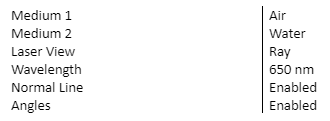
Turn on the laser source.
Using the protractor in the “Toolbox” measure the angle of incidence, I, (the angle between the normal line and the ray of light from the source), the angle of reflection, (The angle between the normal line and the reflected ray), and the angle of refraction, r, (the angle between the normal line and the transmitted ray).

Using the Speed Meter in the Toolbox, measure the speed of the incident ray, reflected ray, and refracted ray.

Repeat procedures (3) – (5), but this time, select “Water” as the first medium and “Air” as the second medium.
Guide Questions:
- What happens to the light from the laser when it strikes the boundary between air and water?
- What relationship exists between the angle of incidence and the angle of reflection?
- How does light bend when it travels from air to water? water to air?
- What happens to the speed of light when it travels from air to water? water to air?
PART 2: Snell’s Law (60 minutes)
Introduction:
When light travels between two different mediums, the velocity and wavelength changes. The result is the “bending” of the light. The “bending” of light is referred to as refraction. The “bending” follows a convenient mathematical relationship called Snell’s law,
Student Learning Outcomes:- Determine the relationship between the incident angle of a light beam and the refracted angle of the light beam as the beam passes from one medium to another.
- Demonstrate the application of Snell’s Law. As consequence, students will be able to
- Determine the critical angle for a light beam that travels from a more dense medium to a less dense medium.
Directions:
Start the PhET “Bending Light” simulation and click on? More Tools.”
Turn on the laser and drag the circular protractor such that the protractor is centered along the normal line and the boundary between the two mediums. Also, drag the speed indicator tool out from the tools located at the lower left of the simulation. The laser can be dragged to change the incident angle. Play with the simulation and try changing some of the different parameters. Make sure to select “Ray” and check the “Angles” box. The top area, the air, is considered medium 1.

The index of refraction, given by the letter n, is defined as the ratio of the speed of light in a vacuum to the speed of light in a medium: n = c/v , where c = 3.0 x 10⁸ m/s. As light travels into different substances, the velocity of light is lower. For our purposes the speed of light in a vacuum will be the same as that of air. Use the speed tool to measure the velocity of light in the glass. Write the velocity in terms of c.
Use the definition for the index of refraction and calculate to verify that the index of refraction for glass is 1.5.
The relationship between the velocity, frequency, and wavelength of a wave is given by v = f𝜆. Since the frequency remains constant when light travels between different media, an expression can be written to solve for λ2 . For medium 1, v1 = f𝜆1 and for medium 2, v2 = f𝜆2. By making an appropriate substitution, write a mathematical expression for 𝜆2, in terms of v1, v2, and 𝜆1 .
Set the following initial data:

Writing all velocities in terms of the speed of light, c, record your measured values for sin 𝜃1 and sin 𝜃2 to three significant figures, and your calculated value for 𝜆2 in nanometers, complete the table below.
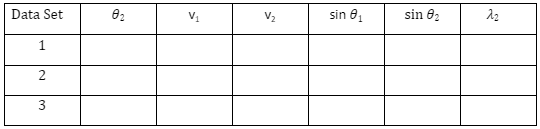
Use the above data and complete the table below for the ratios given. Record your values to 3 sig. figs.

Based upon the pattern you see above for the ratios across different data sets, write a complete mathematical expression for Snell’s Law. Verify your expression by looking up Snell’s Law in your textbook.
Question (Problem solving using Snell’s Law):
A scuba diver on a boat (index of refraction = 1.000) shines a violet light (415 nm) towards the water (index of refraction = 1.336) to illuminate some phosphorescent coral. With what wavelength in nanometers does the light strike the coral? What is the velocity of the light when it strikes the coral, in terms of c? (Hint: the velocity of light in air is 1.00c)
Step 3. Respond
Write a 300-word summary of your lab and your reflections on it. Include the answers to the questions given.Step 4. Share
To share your work, click on the “Reply” button under this post and paste your work into the “Message” box. Make sure to reference others’ intellectual property when necessary. All references should follow 7th Edition APA formatting. For further instructions, see the resource on the Himmelfarb Health Sciences Library: APA citation resource (N.B. references are excluded from word counts).Step 5: Interact
To complete the activity, evaluate and categorize the work from one of your peers based on items A - D of this rubric. Provide a rationale for your grade and comments or suggestions for improvement. To post a reply, click “Reply” on a particular discussion, write your feedback, then click “Post to forum.” You can use the list below as an example:Item A is .…. because…. My suggestions for improvement are….
Item B is .…. because…. My suggestions for improvement are….
Item C is .…. because…. My suggestions for improvement are….
Item D is .…. because…. My suggestions for improvement are….OPTIONAL Step 6: Interact (10 minutes)
If you would like to, you can reply to your peers' posts in a respectful and professional manner. Ensure that your post engages your peers' ideas by including a reflection on their comments, sharing ideas of other potential difficulties and parties involved, or asking thought-provoking questions. If a peer comments on your posting, please reply. To post a reply, click “Reply” on a particular discussion, write your feedback and then click on “Post to forum.”
OPTIONAL Step 7: Interact (10 minutes)
If you would like to, you can reply to your peers' posts in a respectful and professional manner. Ensure that your post engages your peers' ideas by including a reflection on their comments, sharing ideas of other potential difficulties and parties involved, or asking thought-provoking questions. If a peer comments on your posting, please reply. To post a reply, click “Reply” on a particular discussion, write your feedback and then click on “Post to forum.”
- Explain reflection from mirrors.