

Section: Module 2: Lesson 3: Functions | Let's Learn Excel | NextGenU.org
-
Student Learning Outcomes:
Upon completion of this lesson, you will be able to:
- Use Excel's built-in functions for calculations and other operations.
- Use formulas and functions.
-
Students mustMark as done
Required Learning Resources and Activities
-
-
-
-
-
-
Students mustViewMake a submission
Activity 1, Module 2. (30 minutes)
Calculations
Instructions
You are given the order details of a bakery in the table below. Complete the activity by following the instructions.
1. Open Excel and create the table given in an Excel worksheet
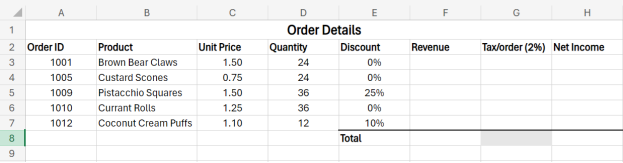
2. Calculate the revenue and tax on the revenue for each of the five products.
3. Calculate the net income of each product.
4. Calculate the total revenue from all products.
5. Calculate the total net income of all products. -
Students mustViewMake a submission
Activity 2, Module 2 (30 minutes)
Formulas and Functions
Instructions
Download the dataset “Activity_Module2_Worksheet.xlxs.” Complete the activity by following the instructions below.
1. Open the file “Activity_Module2_Worksheet.xlxs.”
2. Create a formula that calculates the gross pay for each employee, then use a built-in function to calculate the total gross pay. The gross pay total should appear in cell “E14.” All totals should appear in Row 14.
3. Create a formula that calculates the tax, which is 20% of the gross pay for each employee, then calculate a total for the tax.
4. Create a formula that calculates the net pay for each employee, then calculate a total for the net pay.
5. Create a formula that calculates the superannuation, which is 8% of the gross pay for each employee, then calculate a total for the superannuation. 6. Use functions to determine the average, maximum, and minimum values for each column, setting the number of decimal places to 2. The average, maximum, and minimum values for each column should appear in Rows 16, 17, and 18, respectively.
7. Use the “Save As” command to save the workbook as “Activity Formulas and Functions (Completed).xlxs.”