

Section: Module 4: Lesson 2: Sorting | Let's Learn Excel | NextGenU.org
-
Student Learning Outcomes:
Upon completion of this lesson, you will be able to:
- Sort and custom-sort a sheet and a range with the sort function.
-
Students mustMark as done
Required Learning Resources and Activities
-
-
-
-
Students mustViewMake a submission
Activity 2, Module 4: Sorting (30 minutes)
1. Open the workbook with the dataset for Activity 2, Module 4: Dataset_Activity2_Mod4.xlxs.
2. For the main table, create a custom sort that sorts by grade from smallest to largest and then by camper name from A to Z.
3. Create a sort for the additional information section. Sort by counselor (column H) from A to Z.
When you’re finished, your workbook should look like this: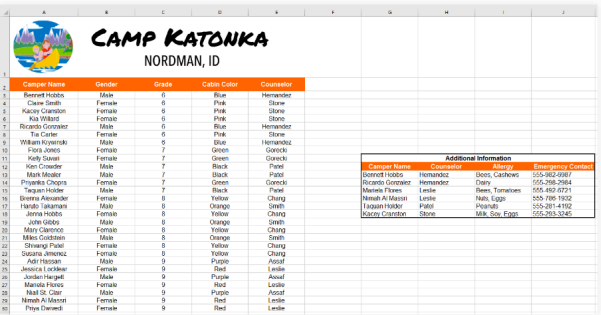
-
-
-
Students mustViewMake a submission
Do the hands-on activity- 30 minutes
-